★★★★★
“PageShot replaced three tools in our review workflow. Capture, annotate, share — done in seconds.”
Product Designer, Linear
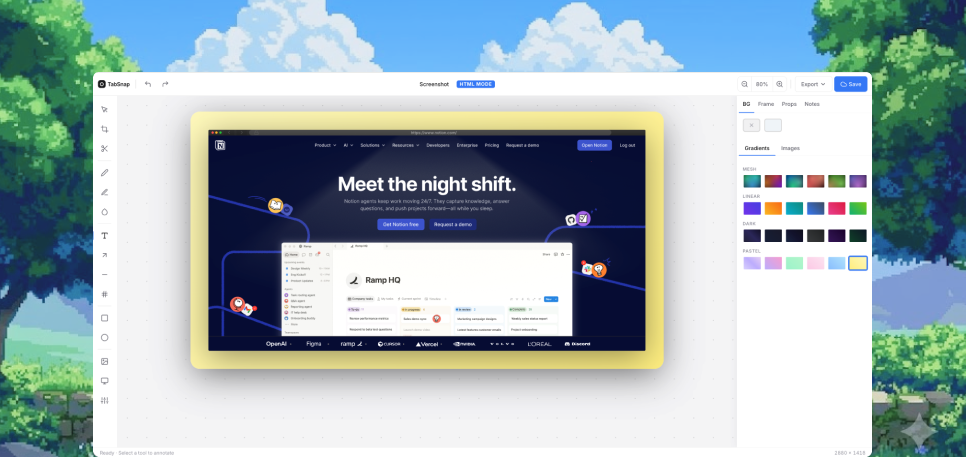
PageShot captures full pages, lets you annotate without leaving the tab, and shares a clean link — no uploads, no friction.
Works on Chrome. No account needed to start.
“PageShot replaced three tools in our review workflow. Capture, annotate, share — done in seconds.”
“Full-page capture that actually works on lazy-loaded pages. I use it every single day.”
“The cleanest sharing flow I've used. Stakeholders open the link and just get it.”
“Annotations stay anchored to what I saw. Zero context loss between me and engineering.”
“Bug reports are 10× faster. Capture, box the broken element, send — that's the whole loop.”
“Lightweight, fast, no fluff. Exactly the screenshot tool I wished existed.”
“PageShot replaced three tools in our review workflow. Capture, annotate, share — done in seconds.”
“Full-page capture that actually works on lazy-loaded pages. I use it every single day.”
“The cleanest sharing flow I've used. Stakeholders open the link and just get it.”
“Annotations stay anchored to what I saw. Zero context loss between me and engineering.”
“Bug reports are 10× faster. Capture, box the broken element, send — that's the whole loop.”
“Lightweight, fast, no fluff. Exactly the screenshot tool I wished existed.”
Grab everything from header to footer in one shot — no stitching, no missing sections, no surprises.
Draw, highlight, and comment without leaving the tab. Your feedback stays anchored to what you saw.
Generate a clean, shareable link instantly. Teammates open it in the browser — no app, no login.
Capture long pages exactly as they render, including lazy-loaded content, sticky headers, and modals.
Keep captures organized by project so designers, engineers, and PMs always reference the same source.
Captures stay yours. Encrypted at rest, scoped to your team, and never used to train anything.
Click the PageShot icon or hit the shortcut. The entire page is captured in place — no new tab, no waiting.
Box, highlight, and label issues right on the capture. Annotations are saved with the image automatically.
Hit share to get a clean URL. Anyone with the link sees your annotated capture instantly in the browser.
Add PageShot to Chrome from the Web Store. Pin it to your toolbar so it's always one click away.
Navigate to any URL — public site, dashboard, or page behind a login. Your session stays in the browser.
PageShot scrolls through the page automatically and stitches a clean full-page capture in seconds.
Draw boxes, highlight regions, and add labels right on top of the image. Save when you're done.
Hit share to generate a clean URL. Drop it in Slack, Linear, or email — anyone with the link can view.
Annual billing saves 20%. Cancel anytime.
PageShot works on virtually every public website. It can capture pages behind logins too — your session stays in your browser and is never sent to our servers.
Captures are encrypted at rest and scoped to your workspace. You control retention, and you can delete any capture permanently at any time. We never use your content to train models.
Yes. The Chrome extension lets you capture and annotate locally without signing up. Create an account only when you want to share links or sync across devices.
On the Pro plan, every member of your workspace can view, comment on, and organize captures together. Permissions are role-based, and share links can be scoped to your team or made public.
PageShot is built for Chrome. It only works on Chrome today — other browsers are not supported.
Add PageShot to Chrome and capture your first page — no account, no setup, no friction.
Add to Chrome — Free